
.png)
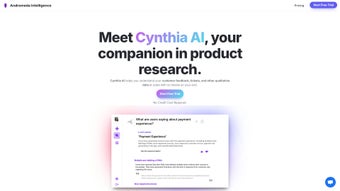
Description
Download Cynthia AI – AI‑Powered Customer Feedback Analysis Tool
Introduction
In today’s fast‑paced product landscape, the ability to listen to customers at scale can be the difference between a thriving product and one that stalls. Cynthia AI steps into this space as a cloud‑based, AI‑driven solution that consolidates feedback from dozens of channels, translates it into clear sentiment scores, and surfaces actionable insights with just a few clicks. Whether you’re a product manager juggling feature requests, a UX researcher hunting for pain points, or a support lead trying to prioritize tickets, Cynthia AI promises to reduce manual effort, eliminate guesswork, and accelerate decision‑making. This review dives deep into the platform’s core capabilities, walks through the onboarding process, evaluates its strengths and weaknesses, and answers the most common questions potential users ask. By the end, you’ll have a solid understanding of whether Cynthia AI is the right addition to your analytics stack and how to get started with a risk‑free trial.
Overview
Cynthia AI is a cloud‑based, subscription‑driven platform that transforms raw customer feedback into clear, actionable insights. By tapping into advanced natural‑language processing and deep‑search algorithms, the software can ingest comments, tickets, reviews, and social media posts from multiple languages and present them in a unified dashboard. Product managers, UX designers, and support teams benefit from automated sentiment scoring, issue clustering, and impact measurement, allowing them to prioritize roadmap items based on real user data rather than gut feeling. The tool integrates natively with popular sources such as Zendesk, Salesforce Service Cloud, Google Play reviews, and major social networks, eliminating the need for manual data extraction. Cynthia AI’s emphasis on user‑centric design means that even non‑technical stakeholders can generate well‑structured reports within minutes, accelerating decision‑making cycles and ultimately boosting user satisfaction across global markets. Beyond basic analytics, the platform offers impact measurement that ties sentiment shifts to specific product releases, giving teams concrete evidence of ROI. Its compliance‑first architecture, featuring GDPR, CCPA, and SOC‑2 controls, ensures that sensitive customer data remains protected while still being readily accessible for analysis.
Key Features
- Multi‑Channel Aggregation: Connect Zendesk, Intercom, Trustpilot, Google Play, Apple App Store, Twitter, Facebook, and more with a few clicks, pulling data from both SaaS and on‑premise sources.
- AI‑Driven Sentiment Analysis: Real‑time polarity detection across 30+ languages, highlighting happy, neutral, and frustrated customers while providing confidence scores for each classification.
- Deep Search & Clustering: Automatic grouping of similar feedback topics, surfacing recurring pain points and feature requests with visual cluster maps.
- Frequency & Trend Metrics: Interactive charts that show how often specific issues appear and whether they are rising or falling over time, helping teams spot emerging problems early.
- Impact Measurement Engine: Quantifies how product changes influence sentiment scores, giving teams evidence of ROI and enabling data‑backed prioritization.
- Custom Report Builder: Drag‑and‑drop widgets, export to PDF/CSV/JSON, and schedule automated email deliveries for stakeholders on any cadence.
- Role‑Based Access Control: Secure permission settings ensure that only authorized users can view or edit sensitive data, supporting enterprise governance policies.
- API & Webhooks: Push insights into internal BI tools or trigger alerts in Slack, Microsoft Teams, or Jira, facilitating seamless workflow integration.
- Data Privacy & Compliance: Built‑in GDPR, CCPA, and SOC‑2 controls keep customer data safe, with options for data residency and customizable retention policies.
- Private‑Cloud Deployment: For organizations requiring on‑premise control, Docker‑based containers and Terraform scripts enable a secure private‑cloud installation on AWS, Azure, or Google Cloud.
Installation, Setup & Compatibility
Because Cynthia AI is a SaaS solution, there is no traditional “install” step. Users simply create an account on the secure website, verify their email, and are greeted by an onboarding wizard. The wizard guides you through connecting each feedback source by entering API keys or OAuth credentials. Most integrations complete within five minutes, and the platform automatically begins pulling historical data for immediate analysis.
For teams that prefer on‑premise data handling, Cynthia AI offers a private‑cloud option that can be deployed on AWS, Azure, or Google Cloud. The deployment package includes Docker containers and Terraform scripts, allowing IT departments to spin up a scalable cluster in under an hour. Once deployed, the system runs a health‑check that validates data schemas, flags duplicate tickets, and ensures language detection accuracy.
Supported operating systems and browsers include:
- Windows 10/11 (latest Edge, Chrome, Firefox)
- macOS Ventura and later (Safari, Chrome, Firefox)
- Linux distributions with modern browsers (Ubuntu 20.04+, Fedora 34+)
- Mobile browsers on iOS and Android for dashboard view only (full editing requires desktop)
After the connections are live, the platform runs an initial “data health” scan that flags duplicate tickets, missing language tags, or malformed JSON payloads. The scan results are displayed in a “Readiness” panel, letting you correct any issues before the first analytical run. Once the system is ready, you can create custom “Insight Boards” that focus on specific product lines, regions, or user segments. The intuitive drag‑and‑drop interface requires no coding, but power users can enhance reports with JavaScript snippets via the advanced editor. All changes are saved automatically, and version history lets you revert to previous report configurations if needed.
Pros & Cons, FAQ & Final Thoughts
Pros
- Highly accurate multilingual sentiment analysis.
- Seamless integration with the most common feedback platforms.
- Actionable impact measurement that links decisions to sentiment shifts.
- User‑friendly UI suitable for non‑technical stakeholders.
- Robust security and compliance features.
- Private‑cloud option for enterprises that need on‑premise control.
- Extensive API and webhook support for workflow automation.
Cons
- Pricing is subscription‑based and may be high for very small startups.
- Advanced customization (e.g., custom NLP models) requires developer resources.
- Mobile experience is limited to viewing; full report building needs a desktop.
- Initial data‑health scan may require manual cleanup for legacy data sets.
- Learning curve for power users who want to write custom JavaScript snippets.
Frequently Asked Questions
Can Cynthia AI handle feedback in languages that use non‑Latin scripts?
Yes. The AI engine supports over 30 languages, including Chinese, Arabic, Cyrillic, and Hindi. It automatically detects the language and applies the appropriate sentiment model.
Is there a free trial available?
Cynthia AI offers a 14‑day free trial with full feature access. No credit card is required to start the trial, and you can cancel anytime before the subscription begins.
How does the platform ensure data privacy?
All data is encrypted in transit (TLS 1.3) and at rest (AES‑256). The platform complies with GDPR, CCPA, and SOC‑2, and you can configure data retention policies to automatically purge old records.
Can I export the analysis results?
Absolutely. Reports can be exported as PDF, CSV, or JSON. You can also schedule automatic email deliveries of the latest insights to stakeholders.
What kind of support does Cynthia AI provide?
Subscribers receive 24/7 email support, a dedicated account manager for Enterprise plans, and access to a knowledge base, community forum, and live webinars.
Is there an on‑premise deployment option?
Yes. For organizations with strict data residency requirements, Cynthia AI offers a private‑cloud deployment using Docker containers and Terraform scripts that can be hosted on AWS, Azure, or Google Cloud.
Conclusion & Call to Action
For product teams that rely on genuine customer voices to shape their roadmap, Cynthia AI delivers a powerful blend of AI‑driven analysis, multilingual capability, and seamless integration. While the subscription cost may be a consideration for early‑stage startups, the time saved on manual data wrangling and the clarity gained from automated impact measurement often justify the investment. If you’re ready to turn scattered feedback into a strategic asset, start your 14‑day free trial today and experience how fast actionable insights can drive product excellence.
Guides & Tutorials for Cynthia AI
How to install Cynthia AI
- Click the Preview / Download button above.
- Once redirected, accept the terms and click Install.
- Wait for the Cynthia AI download to finish on your device.
How to use Cynthia AI
This software is primarily used for its core features described above. Open the app after installation to explore its capabilities.
User Reviews for Cynthia AI 0
No reviews found




